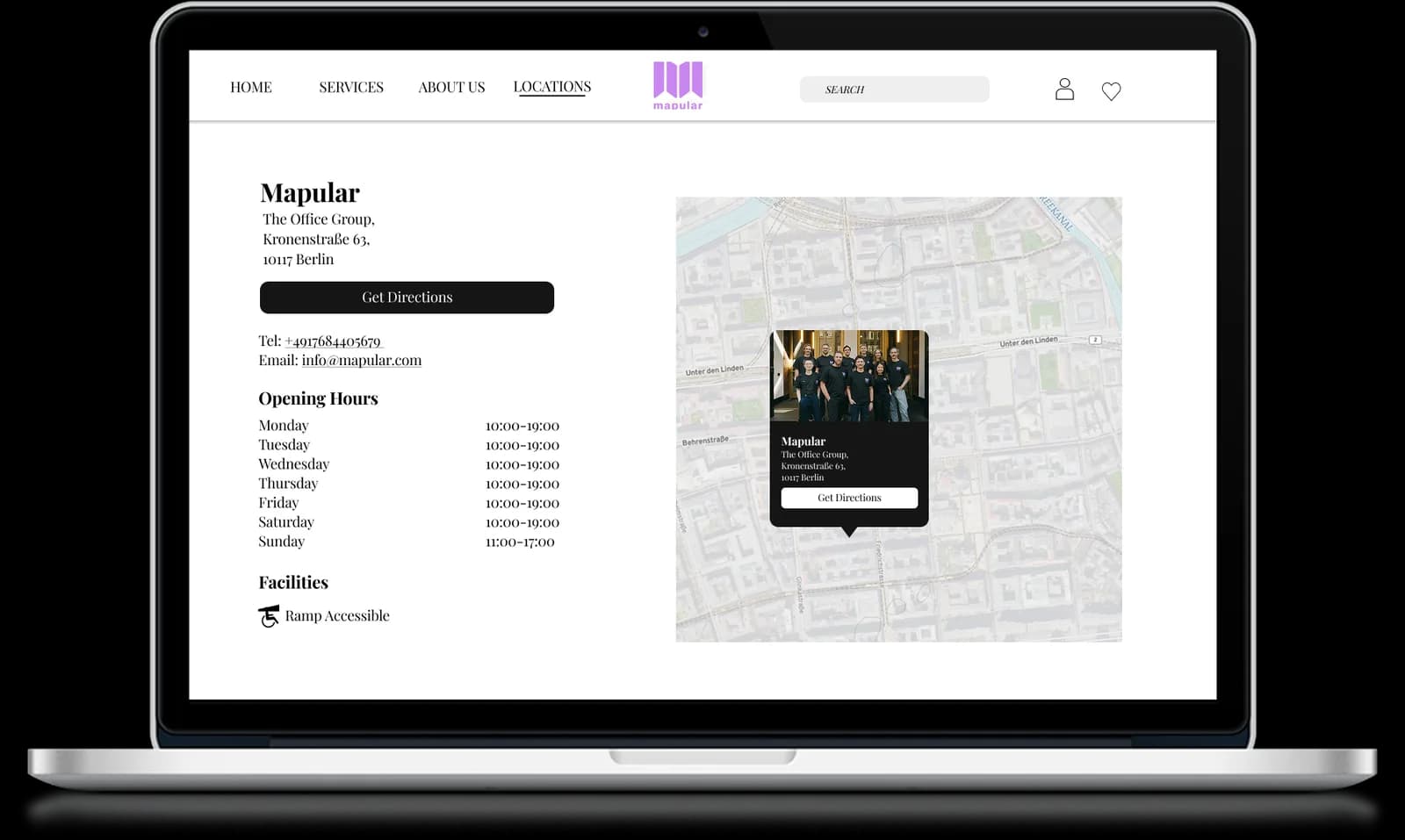
Mapular entwickelt individuelle Store-Seiten, verbunden mit einer gebrandeten, zentralen Filialübersicht mit integrierten SEO-Vorteilen. Seit Jahren wünschen sich Shopify-Händler und D2C-Marken einen Store Locator, der über eine einzelne Kartenseite hinausgeht. Sie wollen dedizierte, indexierbare Seiten für jeden Einzelhandelsstandort – ohne den manuellen Aufwand, diese zu erstellen und zu pflegen. So wird es funktionieren.
Wichtigste Erkenntnisse
- Die meisten Shopify Store Locator Apps basieren auf iFrames und Single-Page-Karten, die für Suchmaschinen unsichtbar sind und die Kundenerfahrung einschränken.
- Individuelle Store-Seiten erzeugen indexierbare, keyword-reiche URLs, die Long-Tail-Traffic bei lokalen Suchanfragen einfangen und Ihre Domain-Autorität stärken.
- Zentrales Datenmanagement bedeutet: Sie aktualisieren Filialdetails einmal, und jede Seite – einschließlich Übersichtskarte und Einzelseiten – bleibt automatisch synchron.
- Anders als statische Shopify-Seiten, die manuell für jeden Standort erstellt werden, generiert Mapular individuelle Store-Seiten dynamisch – skalierbar von 10 auf 10.000 Standorte ohne zusätzlichen Aufwand.
- Das Feature funktioniert nativ innerhalb von Shopify, ohne iFrame-Umwege, ohne Weiterleitungen zu Drittanbietern und ohne individuelle Entwicklungsarbeit.
Das Problem, das wir immer wieder gehört haben
Eine wachsende Einzelhandelsmarke, die zu Shopify Plus migrierte, sagte uns:
„Ich habe mir über 20 Store Locator Apps angesehen. Keine unterstützte individuelle Seiten pro Filiale. Die meisten basieren auf scrollbaren iFrames, was UX und SEO schadet. Es ist unbegreiflich, dass das nicht existiert."
Dieses Gespräch war kein Einzelfall. In den letzten zwei Jahren haben wir die gleiche Frustration von Marken quer durch alle Branchen gehört: Beauty, Food & Beverage, Gesundheit und Wellness, Outdoor-Ausrüstung. Die Anforderungen sind branchenübergreifend identisch.
Ihre Muss-Kriterien:
- Eine übersichtliche Seite mit allen Filialstandorten
- Dedizierte individuelle Store-Seiten für SEO, UX und Personalisierung
- Zentrale Updates: Öffnungszeiten einmal ändern, und es synchronisiert sich überall
- Unterstützung für Google Maps Integration und Styling
- Geringer Wartungsaufwand, ohne manuelle Seitenbearbeitung pro Standort
Die Marktlücke war offensichtlich. Bestehende Shopify Store Locator Apps boten entweder ein einfaches Karten-Embed ohne individuelle Seiten oder erforderten, dass Händler für jeden Standort manuell Shopify-Seiten erstellen – ein Ansatz, der schnell zusammenbricht, sobald man mehr als eine Handvoll Filialen hat.
Warum individuelle Store-Seiten für SEO wichtig sind
Suchmaschinenoptimierung ist der Hauptgrund, warum Marken individuelle Store-Seiten wollen – und die Wirkung ist beträchtlich. Hier erfahren Sie, warum ein Single-Page-Kartenlocator SEO-Potenzial verschenkt.
Indexierbare URLs erfassen lokale Suchintention
Wenn ein Kunde nach „Ihre Marke + Stadtname" oder „Produkt kaufen in meiner Nähe" sucht, braucht Google indexierbaren Content, um ein relevantes Ergebnis zu liefern. Ein Single-Page-Locator, bei dem alle Standorte dynamisch in einem JavaScript-Widget gerendert werden, gibt Google nichts zum Indexieren. Individuelle Store-Seiten hingegen erzeugen einzigartige URLs wie /stores/downtown-chicago oder /stores/brooklyn-ny, die Suchmaschinen crawlen, indexieren und ranken können.
Jede Seite zielt natürlich auf ein bestimmtes lokales Keyword-Cluster ab. Über die Zeit hinweg bauen Hunderte von Standortseiten Domain-Autorität auf und erfassen Long-Tail-Traffic, der sonst an Ihre Einzelhandelspartner oder Wettbewerber ginge.
Strukturierte Daten und lokales Schema
Mapulars individuelle Store-Seiten beinhalten strukturierte Daten mit LocalBusiness-Schema. Das teilt Google genau mit, was jede Seite darstellt: einen physischen Geschäftsstandort mit Name, Adresse, Telefonnummer, Öffnungszeiten und geografischen Koordinaten. Das Ergebnis sind reichhaltigere Suchergebnis-Snippets, verbesserte Sichtbarkeit im Local Pack und eine bessere Chance, bei „in meiner Nähe"-Anfragen zu erscheinen.
Reduzierte Absprungraten
Wenn ein Nutzer von einem Suchergebnis auf einer dedizierten Store-Seite landet, sieht er sofort die benötigten Informationen: Adresse, Öffnungszeiten, Wegbeschreibung, Kontaktdaten und Produktverfügbarkeit. Vergleichen Sie das mit einer generischen Locator-Seite, auf der der Nutzer erst suchen, scrollen und klicken muss, um die relevante Filiale zu finden. Die dedizierte Seite bietet einen schnelleren Weg zur Information, was Absprungraten reduziert und positive Engagement-Signale an Google zurücksendet.
Für einen umfassenderen Blick darauf, wie Store Locators als strategische Tools über die einfache Suche hinaus dienen, lesen Sie unseren Beitrag über die Kraft eines leistungsstarken Store Locators für Konsummarken.
Wie es sich von Wettbewerbern unterscheidet
Wir haben jede größere Shopify Store Locator App evaluiert, bevor wir dieses Feature entwickelt haben – und die Landschaft lässt sich in drei Kategorien einteilen.
Einfache Karten-Widgets
Die meisten Locator-Apps im Shopify App Store betten eine Karte per iFrame oder JavaScript-Snippet ein. Standorte werden dynamisch geladen, und es gibt keine Möglichkeit, individuelle Seiten zu generieren. Diese Apps funktionieren für einfache Anwendungsfälle, bieten aber keinerlei SEO-Nutzen und eingeschränkte Branding-Kontrolle. Wenn Sie verstehen möchten, wie sich diese Apps in Funktionen und Preisen vergleichen, schlüsselt unser vollständiger Leitfaden zu den besten Shopify Store Locator Apps die Optionen im Detail auf.
Manuelle Seitenerstellung
Manche Marken umgehen das Fehlen individueller Seiten, indem sie für jeden Standort statische Shopify-Seiten erstellen. Dieser Ansatz funktioniert in kleinem Maßstab, wird aber schnell unhandlich. Wenn Sie 200 Standorte haben und Feiertagsöffnungszeiten aktualisieren müssen, bearbeiten Sie 200 Seiten. Wenn ein Einzelhandelspartner schließt, müssen Sie daran denken, die entsprechende Seite zu löschen. Es gibt keine zentrale Datenquelle, sodass sich Inkonsistenzen schnell einschleichen.
Mapulars Ansatz
Mapular generiert individuelle Store-Seiten dynamisch aus einer einzigen, zentralen Datenquelle. Wenn Sie die Öffnungszeiten, Adresse oder den Status einer Filiale in Ihrem Mapular-Dashboard aktualisieren, wird jede Seite, die diese Filiale referenziert, automatisch aktualisiert. Seiten werden nativ innerhalb Ihres Shopify-Themes gerendert und passen sich Ihrem Marken-Designsystem an – ohne benutzerdefinierte Liquid-Templates oder Drittanbieter-iFrames.
Die Architektur bedeutet, dass Sie die SEO-Vorteile individueller Seiten mit der Wartungseinfachheit einer zentralen Datenbank erhalten. Es skaliert von einer Handvoll Flagship-Stores bis zu Tausenden von Einzelhandelspartner-Standorten ohne Änderung Ihres Workflows.
Verbesserungen der Kundenerfahrung
SEO treibt die Auffindbarkeit, aber die Kundenerfahrung auf der Seite entscheidet, ob der Besucher zum Filialbesuch konvertiert. Mapulars individuelle Store-Seiten sind mit dem Endkunden im Blick gestaltet.
Reichhaltiger, standortspezifischer Content
Jede Store-Seite kann anzeigen:
- Vollständige Adresse mit eingebetteter, gebrandeter Karte
- Öffnungszeiten, einschließlich Feiertags- und Saisonpläne
- Telefonnummer mit Tap-to-Call auf Mobilgeräten
- Fotos der Ladenfront oder des Innenraums
- Verfügbare Produktlinien oder Services an diesem bestimmten Standort
- Routenintegration mit Google Maps oder Apple Maps
Dieses Detailniveau beantwortet die Fragen des Kunden, bevor er sie stellen muss – das reduziert Reibung und erhöht die Wahrscheinlichkeit eines Besuchs.
Konsistente Markenerfahrung
Da die Seiten nativ innerhalb Ihres Shopify-Themes gerendert werden, haben Kunden nie das Gefühl, Ihre Website verlassen zu haben. Schriften, Farben, Layout und Navigation sind durchgängig konsistent mit dem Rest Ihrer Website. Das steht in starkem Kontrast zu iFrame-basierten Locators, die in einer visuell abgekoppelten Box laden und häufig Layoutprobleme, Scroll-Fallen und stilistische Inkonsistenzen verursachen.
Mobile-First-Design
Die Mehrheit der „wo kaufen" und „Geschäfte in meiner Nähe"-Suchanfragen findet auf Mobilgeräten statt. Mapulars individuelle Store-Seiten sind Mobile-first entwickelt, mit touch-optimierten Kartensteuerungen, prominent platzierten Call-to-Action-Buttons und schnellen Ladezeiten. Die Standortabfrage zeigt sofort nahegelegene Geschäfte an, sodass mobile Nutzer oft innerhalb von Sekunden nach dem Seitenaufruf finden, was sie suchen.
Was der Mapular Store Locator heute bereits bietet
Mit dem Mapular Store Locator erhalten Shopify-Store-Betreiber bereits ein robustes Fundament:
- Schnelle 4-Schritte-Einrichtung. Starten Sie Ihren Store Locator in wenigen Minuten, ohne Programmierkenntnisse.
- Volle Standortkontrolle. Bearbeiten Sie Adressen, Öffnungszeiten und Informationen mit voller Kontrolle.
- Design anpassen. Passen Sie das Erscheinungsbild über integrierte Stile und CSS-Optionen an Ihre Marke an.
- Standorte per Massenupload. Fügen Sie Filialen skalierbar per Google Sheets Import oder CSV-Upload hinzu.
- Kundensuchen tracken. Sehen Sie, wo Nutzer suchen, um Ihre Einzelhandelspräsenz zu optimieren.
Das Feature für individuelle Store-Seiten baut auf diesem Fundament auf und fügt SEO-Sichtbarkeit sowie eine bessere Kundenerfahrung für jeden gelisteten Einzelhandelsstandort hinzu.
Warum es für D2C-Marken auf dem Weg zur Omnichannel-Strategie wichtig ist
D2C-Marken, die in den Einzelhandel expandieren, stehen vor einer besonderen Herausforderung: Sie müssen Kunden in Geschäfte leiten, die ihnen nicht gehören. Anders als traditionelle Einzelhändler können D2C-Marken die Erfahrung im Laden nicht kontrollieren – was den digitalen Kontaktpunkt umso wichtiger macht. Der Store Locator und seine individuellen Seiten werden zum primären Werkzeug der Marke, um Kunden zum richtigen Standort mit den richtigen Erwartungen zu führen.
Individuelle Store-Seiten bieten D2C-Marken außerdem eine Content-Fläche, um hervorzuheben, welche Produkte bei jedem Einzelhändler verfügbar sind, ob der Standort exklusive Artikel führt und wie das Einkaufserlebnis vor Ort aussieht. Diese Art von Detail stärkt das Vertrauen des Kunden und unterstützt die Beziehung zum Einzelhandelspartner. Mehr darüber, wie D2C-Marken Location Intelligence in ihren Wachstumsstrategien einsetzen, erfahren Sie in unserem Beitrag darüber, warum D2C-Marken auf Location Intelligence setzen.
Zentrale Daten, kein manueller Aufwand
Eine der häufigsten Bedenken, die wir von Operations-Teams hören, betrifft den Wartungsaufwand. 500 Einzelhandelspartner-Standorte hinzuzufügen sollte nicht bedeuten, 500 Seiten von Hand zu erstellen. Mit Mapular ist der Workflow einfach:
- Importieren Sie Ihre Standortdaten per Google Sheets Sync, CSV-Upload oder API.
- Mapular generiert automatisch die Übersichtsseite und die individuellen Store-Seiten.
- Aktualisierungen an den Daten eines Standorts werden sofort auf alle Seiten übertragen.
- Neue Standorte werden hinzugefügt und eingestellte Standorte entfernt, ohne Ihr Shopify-Theme anzufassen.
Dieser zentralisierte Ansatz bedeutet, dass Ihr Team Zeit für Strategie und Wachstum aufwendet – statt für die Pflege von Standortseiten.
Fazit
Individuelle Store-Seiten sind das fehlende Puzzlestück, das einen Store Locator von einem einfachen Hilfsmittel in einen echten Wachstumskanal verwandelt. Sie erfassen organischen Suchtraffic, den eine Single-Page-Karte nicht erreichen kann, sie liefern eine bessere Kundenerfahrung, die Besucher in Filialbesucher konvertiert, und sie skalieren ohne zusätzlichen manuellen Aufwand für Ihr Team.
Mapulars Implementierung wird diese Fähigkeit nativ in Shopify bringen – ohne iFrames, ohne manuelle Seitenerstellung und ohne Kompromisse bei der Markenkonsistenz. Individuelle Store-Seiten stehen auf der Mapular-Roadmap – installieren Sie den Store Locator heute, um alle aktuellen Features zu nutzen, und Sie erfahren als Erste, wenn Store-Seiten verfügbar sind.
Mapular Store Locator kostenlos auf Shopify installieren Sprechen Sie mit unserem Team