How to Change the Map Pin
Customize map pins to match your brand — choose built-in shapes, upload an SVG, use an image URL, or set unique pins per store.
Customize the map pins on your store locator to match your brand. You can choose from built-in shapes, upload a custom SVG, or use an image URL — and even set unique pins per store.
Global Map Pin (All Stores)
- 1Go to Settings > Appearance tab.
- 2Scroll to the Map Pin section.
- 3Choose one of the 5 options:
| Option | Description |
|---|---|
| Circle | Simple colored circle (default) |
| Pin | Classic teardrop-shaped map pin |
| Square | Rounded square marker |
| Import SVG | Upload your own SVG file |
| Use Image URL | Paste a URL to any image (PNG, JPG, WebP) |
For Circle, Pin, or Square, you can also customize:
- Fill Color — the background color of the pin (default:
#CA86F1) - Stroke Color — the border/outline color (default:
#000000)
Click Save to apply.
Using a Custom SVG
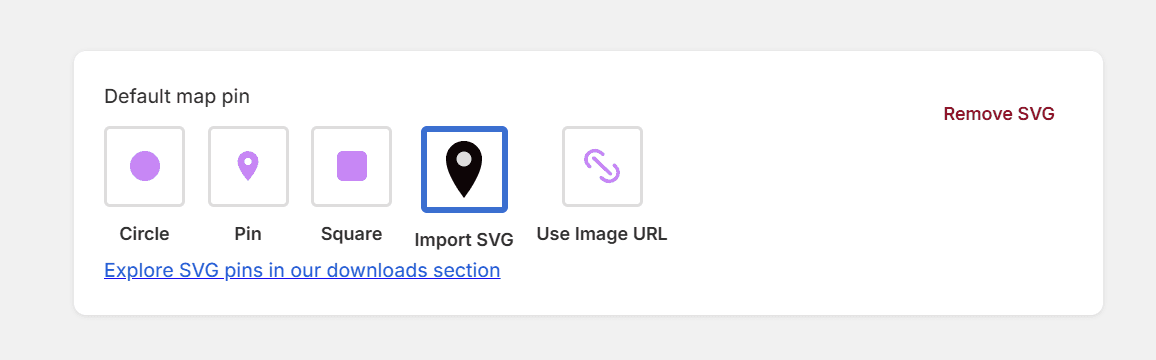
- 1Select Import SVG.
- 2Click the upload area and select your
.svgfile. - 3The SVG will be embedded directly — no external hosting needed.
- 4Click Save.
Keep your SVG simple and small (under 50 KB) for best performance. Make sure it looks good at roughly 30×30 pixels.
Need inspiration? Check out our ready-made SVG pin icons on the Downloads page.
Using an Image URL
- 1Select Use Image URL.
- 2Paste the full URL to your image (must start with
https://). - 3A preview will appear if the URL is valid.
- 4Click Save.
Supported formats: PNG, JPG, WebP, GIF.
Individual Pin per Store
You can override the global pin for specific stores:
- 1Go to Stores and click on a store to edit it.
- 2Find the Map Icon URL field.
- 3Paste the URL of the custom icon for this store.
- 4Click Save.
This also works with CSV import — include a column named icon_url (or marker_icon, map_icon, pin_icon) with the image URL for each store.
Per-store icons override the global pin setting. If a store has no custom icon, it falls back to the global pin.
Noch nicht weitergekommen?
Wir helfen Ihnen gerne
Oder senden Sie uns eine E-Mail an support-store-locator@mapular.com