Set Up Your Google Maps Key
Connect a Google Maps API key to use Google's basemap with preset and custom styles.
By default, our Store Locator includes a free, open-source basemap from OpenStreetMap, which does not require any token or API key.
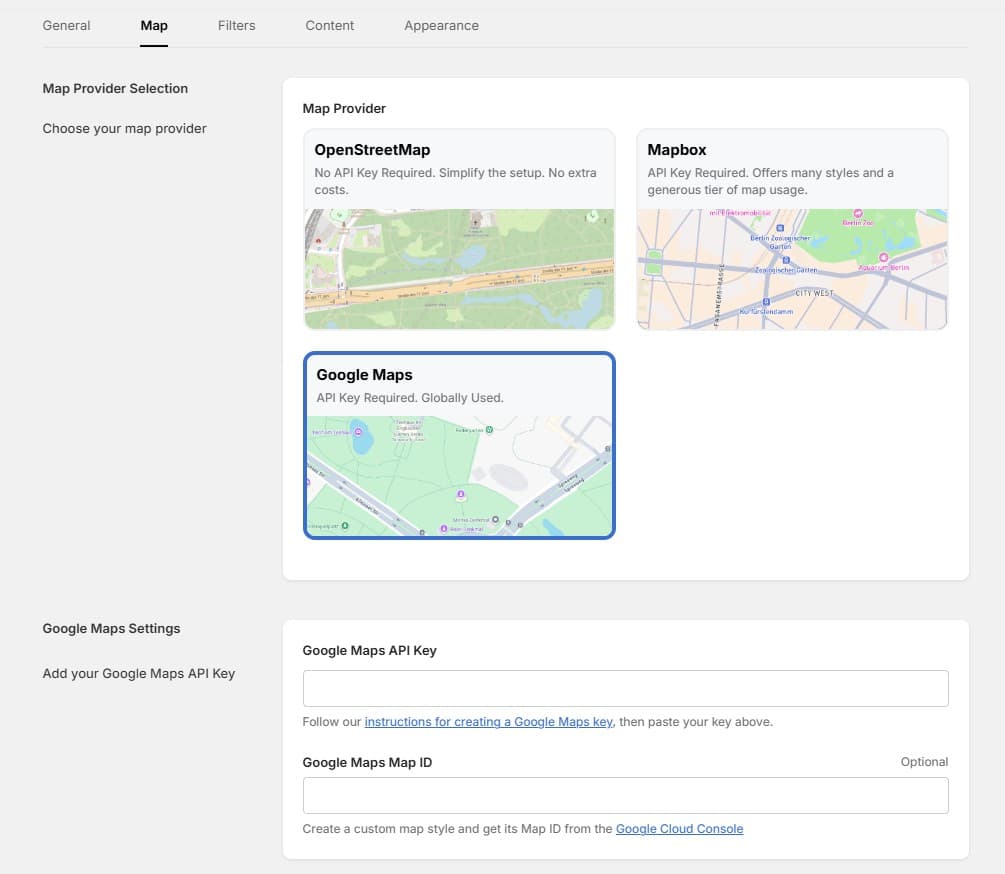
If you prefer to use Google Maps as your basemap, you will need to connect a Google Maps API key.
Why Google Maps?
Google Maps is the most widely recognized mapping platform. It offers:
- The familiar Google Maps look and feel
- Multiple preset styles (Standard, Silver, Retro, Dark)
- Custom cloud-based styles via Map ID
- Reliable global coverage and performance
Step-by-Step Setup
- 1Go to the Google Cloud Console and sign in with your Google account.
- 2Create a new project (or select an existing one).
- 3Open APIs & Services and click Enable APIs and Services.
- 4Search for Maps JavaScript API and enable it.
- 5Go to APIs & Services > Credentials.
- 6Click Create Credentials > API key.
- 7Copy the generated API key.
- 8Go back to your Shopify Store Locator app settings.
- 9In Settings > Map, select Google Maps as your map provider.
- 10Paste the API key into the Google Maps API Key field and click Save.
Your map will now load with the Google Maps basemap.
Google Maps includes a free monthly credit of $200, which covers around 28,000 map loads per month. Most Shopify stores will stay well within this limit. See Google Maps pricing for details.
Optional: Custom Map Styling
For full brand customization, you can create a custom map style in Google Maps:
- 1Open the Maps Studio in Google Cloud Console.
- 2Create a new map style and customize colors, labels, and features.
- 3Save the style and copy the Map ID.
- 4In the Store Locator settings, paste the Map ID into the Google Maps Map ID field.
With a Map ID connected, select Custom as your map style to use your branded design.
Custom cloud-based styles require a Map ID. Preset styles (Standard, Silver, Retro, Dark) work with just an API key.
Video Tutorial
Video Tutorial
How to set up your Google Maps API Key
Noch nicht weitergekommen?
Wir helfen Ihnen gerne
Oder senden Sie uns eine E-Mail an support-store-locator@mapular.com