When UNESCO asked Mapular to extend the Sites Navigator with an automated environmental risk and alert system, the brief was simple to state and hard to execute:
- Monitor every inscribed World Heritage property worldwide, more than 1,200 sites.
- Integrate live feeds from multiple external hazard systems.
- Keep everything on Esri's out-of-the-box stack so UNESCO's team can maintain it without external help.
- Run every day and every week without breaking.
This is an architecture story, not an implementation manual. The specific thresholds and scientific logic belong to UNESCO, not to a blog post.
The stack
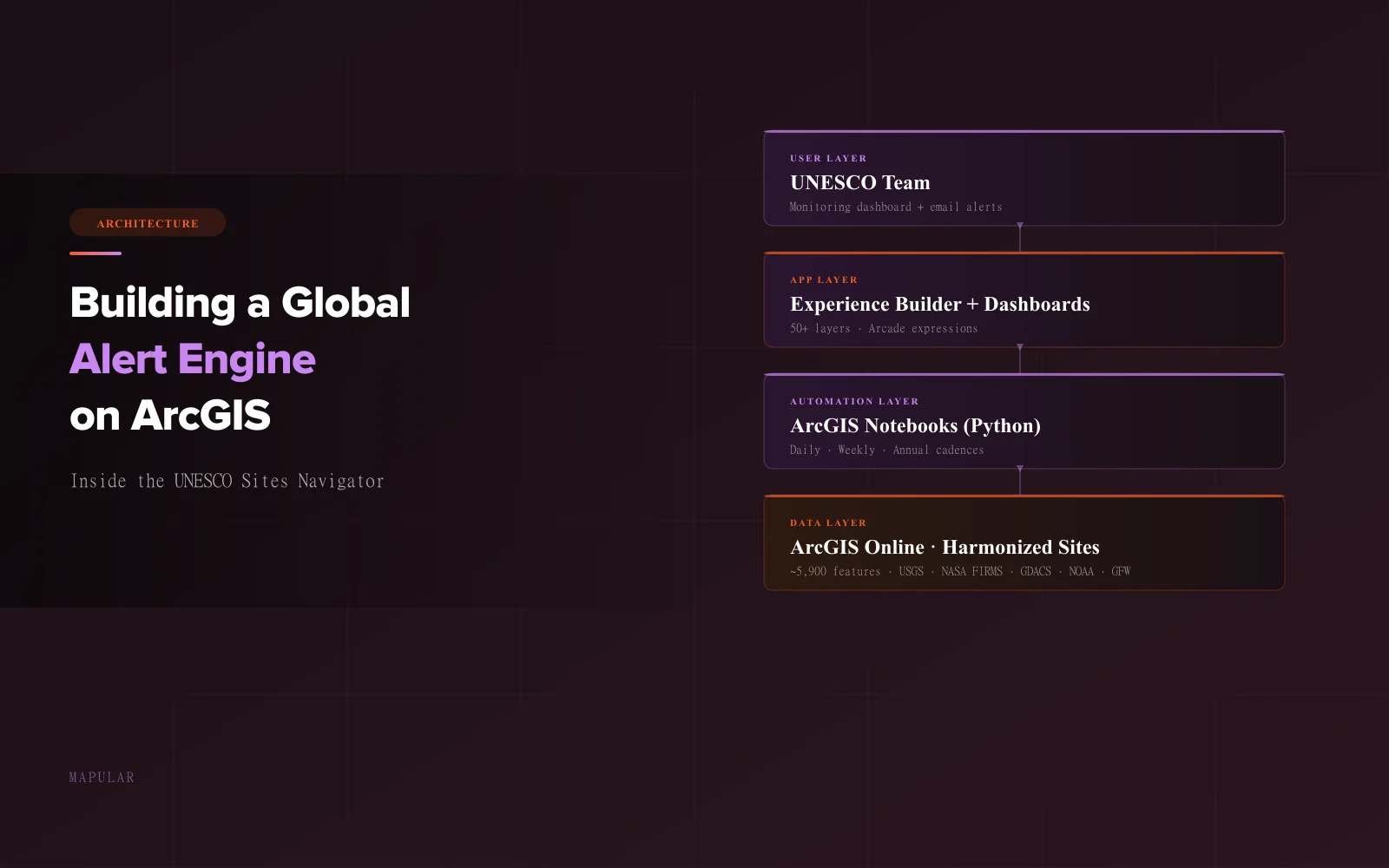
| Component | Technology |
|---|---|
| Data hosting | ArcGIS Online |
| Web application | ArcGIS Experience Builder |
| Monitoring dashboard | ArcGIS Dashboards |
| Scheduled analysis | ArcGIS Notebooks (Python) |
| Pop-up and summary logic | ArcGIS Arcade |
Everything runs inside the ArcGIS ecosystem. No external orchestrator, no custom backend, no services that only one vendor can keep alive. That constraint is the single most important piece of the design.
Start with a harmonized spatial foundation
World Heritage Sites come in very different shapes, from archaeological points to multi-hundred-kilometer natural reserves. The alert engine needed one consistent geometry set to run against, so the first layer we built was a harmonized sites layer in ArcGIS Online: a single canonical feature layer, rebuilt on a cadence, that every downstream pipeline reads from.
Two details matter. First, the buffer distance for each site is computed during harmonization and stored on the feature, so alert logic can filter in one step. Second, alert state is preserved across rebuilds, so a harmonization run never clears active alerts mid-cycle.
Get the geometry right and everything downstream becomes tractable. Skip this step and nothing else works.
Design principles that kept the alert system coherent
Ecological relevance. Hazards that threaten an ecosystem (coral bleaching, vegetation disturbance) are only evaluated for Natural and Mixed sites. Hazards driven by physical proximity (earthquakes, tsunamis, fires) are evaluated for all site types. Coral bleaching is a catastrophe for a marine reserve but not necessarily for a stone monument, and the system reflects that.
Alert, not verdict. The platform flags situations that warrant attention. UNESCO's team, with local context and scientific expertise, interprets the alerts and decides on action. Thresholds were defined by UNESCO's scientific advisors, not chosen arbitrarily in code.
Cadence-driven pipelines
The analysis runs on two cadences:
- Daily for fast-moving hazards where hours matter (earthquakes, tsunamis, fires, coral bleaching).
- Weekly for slower-moving change detection against satellite feeds.
Each pipeline follows the same predictable pattern — the reason the system runs unattended.
The consumption layer
Once data is written, the user-facing side is pure out-of-the-box Esri.
ArcGIS Dashboards surface current alert status using Arcade expressions that read directly from the harmonized layer. ArcGIS Experience Builder organizes dozens of layers into thematic groups so the map stays navigable. And at the end of each daily run, the notebook itself sends an email with alert tables to UNESCO's team, no separate messaging service required.
Want to talk architecture?
Mapular is an Esri Germany partner and applicant to the Esri Nonprofit Specialty. We help teams design and build scheduled-analysis systems, alert pipelines, and operational monitoring platforms on the ArcGIS stack.