Verfügbare Daten
Ein Überblick der gebündelten Datenschichten in jedem Mapbook: Demografie, Kaufkraft und Points of Interest.
Jedes Mapbook hat Zugriff auf gebündelte Datenschichten, die Sie ohne eigenen Upload hinzufügen können. Diese Schichten umfassen Demografie, Kaufkraft und Points of Interest in mehreren Ländern.
Demografie
| Schicht | Abdeckung | Wichtige Attribute |
|---|---|---|
| Deutschland Demografie | Bundesweit | Bevölkerung (gesamt, männlich/weiblich), Altersgruppen (0-14, 15-29, 30-44, 45-59, 60+), Kaufkraft, Haushalte |
| US Demografie | Bundesweit | Bevölkerung (gesamt, männlich/weiblich), Altersgruppen, Median-Haushaltseinkommen |
| Niederlande Demografie | Bundesweit | Bevölkerung (gesamt, männlich/weiblich), Altersgruppen |
Die deutschen Daten enthalten Kaufkraft in EUR/Kopf, Gesamt-EUR, Pro-Mille-Anteil der nationalen Kaufkraft und einen Kaufkraftindex. Außerdem enthalten sie die Haushaltszahl und die durchschnittliche Haushaltsgröße.
Alle Demografiedaten sind auf H3-Hexagonalzellen in den Auflösungen 5-9 voraggregiert und stehen damit auf jeder Zoomstufe zur Anzeige bereit.
Points of Interest
POI-Daten umfassen 50+ Hauptkategorien und 200+ Unterkategorien aus verschiedenen Datenbanken.
| Land | Abdeckung |
|---|---|
| Österreich | 50+ Kategorien, 200+ Unterkategorien |
| Belgien | 50+ Kategorien, 200+ Unterkategorien |
| Frankreich | 50+ Kategorien, 200+ Unterkategorien |
| Deutschland | 50+ Kategorien, 200+ Unterkategorien |
| Luxemburg | 50+ Kategorien, 200+ Unterkategorien |
| Niederlande | 50+ Kategorien, 200+ Unterkategorien |
| Polen | 50+ Kategorien, 200+ Unterkategorien |
| Schweiz | 50+ Kategorien, 200+ Unterkategorien |
| Vereinigtes Königreich | 50+ Kategorien, 200+ Unterkategorien |
| Vereinigte Staaten | 50+ Kategorien, 200+ Unterkategorien |
POI-Kategorien umfassen Lebensmitteleinzelhandel, Gastronomie, Shopping, Gesundheitswesen, Verkehr, Gastronomie und mehr. Sie können nach Kategoriehierarchie filtern, nach Name oder Marke suchen und mehrere POI-Filter in einer einzigen Schicht kombinieren.
Um Lebensmittel-Wettbewerber zu finden, nutzen Sie die POI-Schicht und filtern nach der Kategorie Einzelhandel. Darin können Sie einzeln zu Supermärkten, Discountern oder kleineren Lebensmittelformaten eingrenzen.
Wie Sie eine Datenschicht hinzufügen
- 1Öffnen Sie ein Mapbook.
- 2Klicken Sie auf + Spalte hinzufügen (oder den +-Button in der Seitenleiste).
- 3Wählen Sie den Tab Laden im Aktionskatalog.
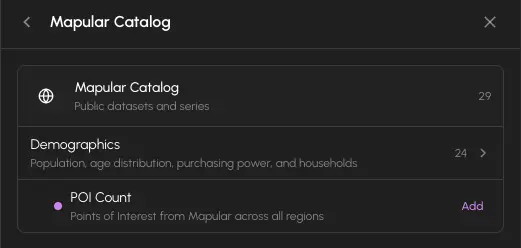
- 4Wählen Sie aus dem Mapular-Katalog für gebündelte Daten oder Ihren eigenen hochgeladenen Datensätzen.
- 5Wählen Sie die gewünschte Schicht und klicken Sie auf Hinzufügen.
Die Schicht erscheint als neue Spalte in der Tabelle und als neue Visualisierung auf der Karte.
Basiskarten
Sie können den Hintergrundkartenstil jederzeit über die Kartensteuerung wechseln:
| Stil | Beschreibung |
|---|---|
| Streets | Beschriftete Straßenkarte |
| Satellite | Luftbildaufnahmen |
| Light | Minimales helles Design |
| Dark | Minimales dunkles Design |
| Benutzerdefiniert | Beliebige Mapbox-Style-URL |