Formula and Filter Series
How to build computed columns using formulas and reusable filter expressions.
Formula and filter series let you build computed columns on top of your existing data. Instead of adding a raw data column, you write an expression that combines or transforms existing series.
Filter series
A filter series is a series that applies a filter condition as a reusable value. It creates a new column that shows the filtered result of an existing series.
Use filter series when you want to:
- Count only specific POI types from a wider layer
- Restrict a demographic series to a specific value range
- Reuse the same filter in multiple formula series
Add a filter series
- 1Click + Add column and go to the Transform tab.
- 2Select Filter series.
- 3Choose the source series to filter.
- 4Define the filter condition (e.g., value >= 100).
- 5Click Add. The column appears showing values that pass the filter.
Formula series
A formula series evaluates a mathematical expression across all cells. You can reference any existing series in the expression.
Common use cases:
- Competitor density ratio:
poi_count / population * 1000 - Market share proxy:
my_stores / (my_stores + competitors) - Indexed purchasing power:
purchasing_power / national_average * 100
Add a formula series
- 1Click + Add column and go to the Transform tab.
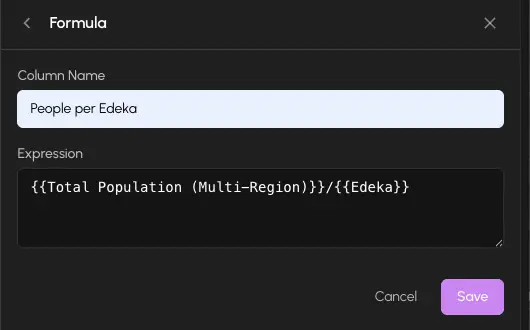
- 2Select Formula series.
- 3In the expression editor, type your formula. Reference other columns by name.
- 4The editor shows a live preview of the result.
- 5Click Add. The computed column appears in the table and on the map.
Formula-to-formula references
Formula series can reference other formula series in their expressions. This lets you build composed computations in steps.
For example:
- Create a filter series:
filtered_poi(POI count where value > 0) - Create a formula:
population / filtered_poi(population per POI location)
The second formula references the first. Both update together whenever the underlying data changes.
Build complex indicators incrementally. Create intermediate filter or formula series as building blocks, then reference them in a final formula. This keeps each step readable and makes debugging easier.
Operators and functions
Formulas support standard arithmetic operators:
| Operator | Meaning |
|---|---|
+ | Addition |
- | Subtraction |
* | Multiplication |
/ | Division |
() | Grouping |
Division by zero returns null for that cell, which is displayed as empty in the table and uses the null color on the map.